What it is
The EBU's white paper The Dynamic Media Facility: Reference Architecture v2.0 describes how a broadcast facility can be built from software instead of fixed hardware. Productions are workloads: they are designed, given resources, run on shared compute, and torn down when they're done. Inside the facility, media moves between functions through the Media eXchange Layer (MXL) rather than across cables or the network.
The white paper is a reference architecture, not a product. This project is an attempt to make it real on one machine, end to end, with real software. It has two parts:
DMF Toolkit
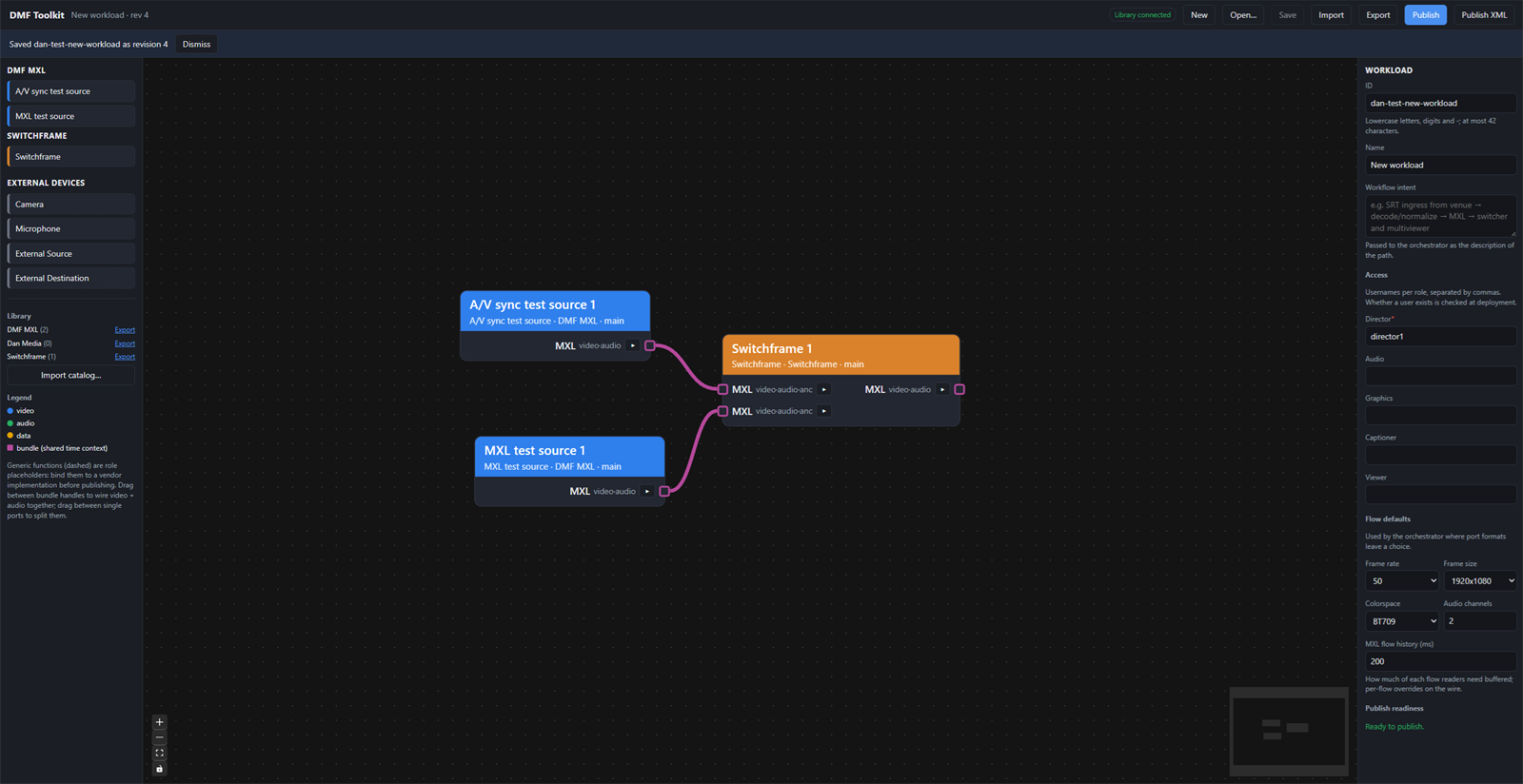
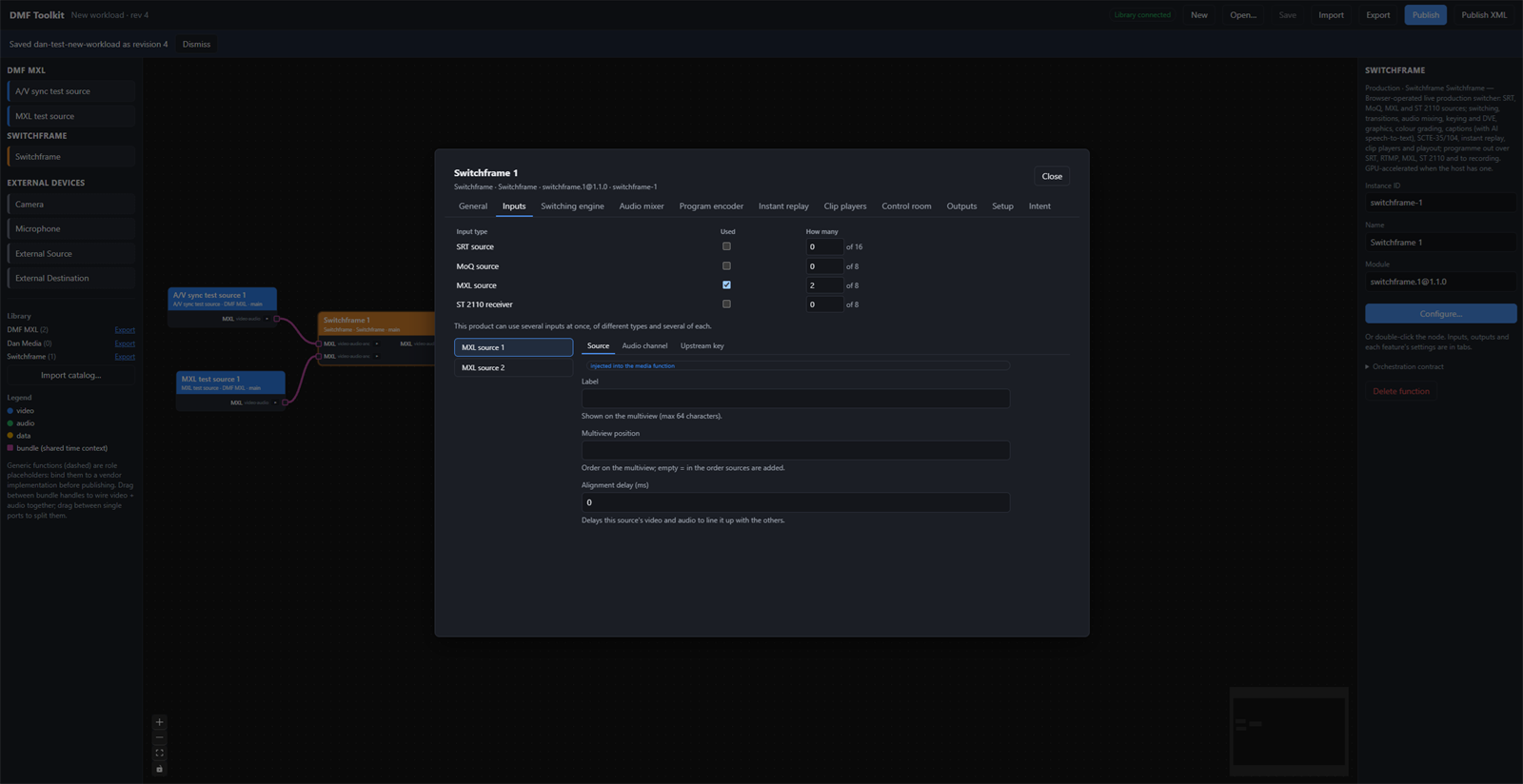
A web app for designing a workload. You place products on a canvas (a vision mixer, camera sources, an SRT encoder at the edge), configure them and wire them together. Then you publish the result as an XML desired state.
React, TypeScript, React Flow, and a small Node API with SQLite.
Source on GitHub
DMF Orchestrator
Builds the facility and runs what the Toolkit publishes. It compiles the XML, checks that the facility can run the design, then provisions it on Kubernetes, with MXL shared memory carrying the media between functions.
Python, Terraform, Ansible, k3s, Helm, Keycloak and Prometheus.
Source on GitHub
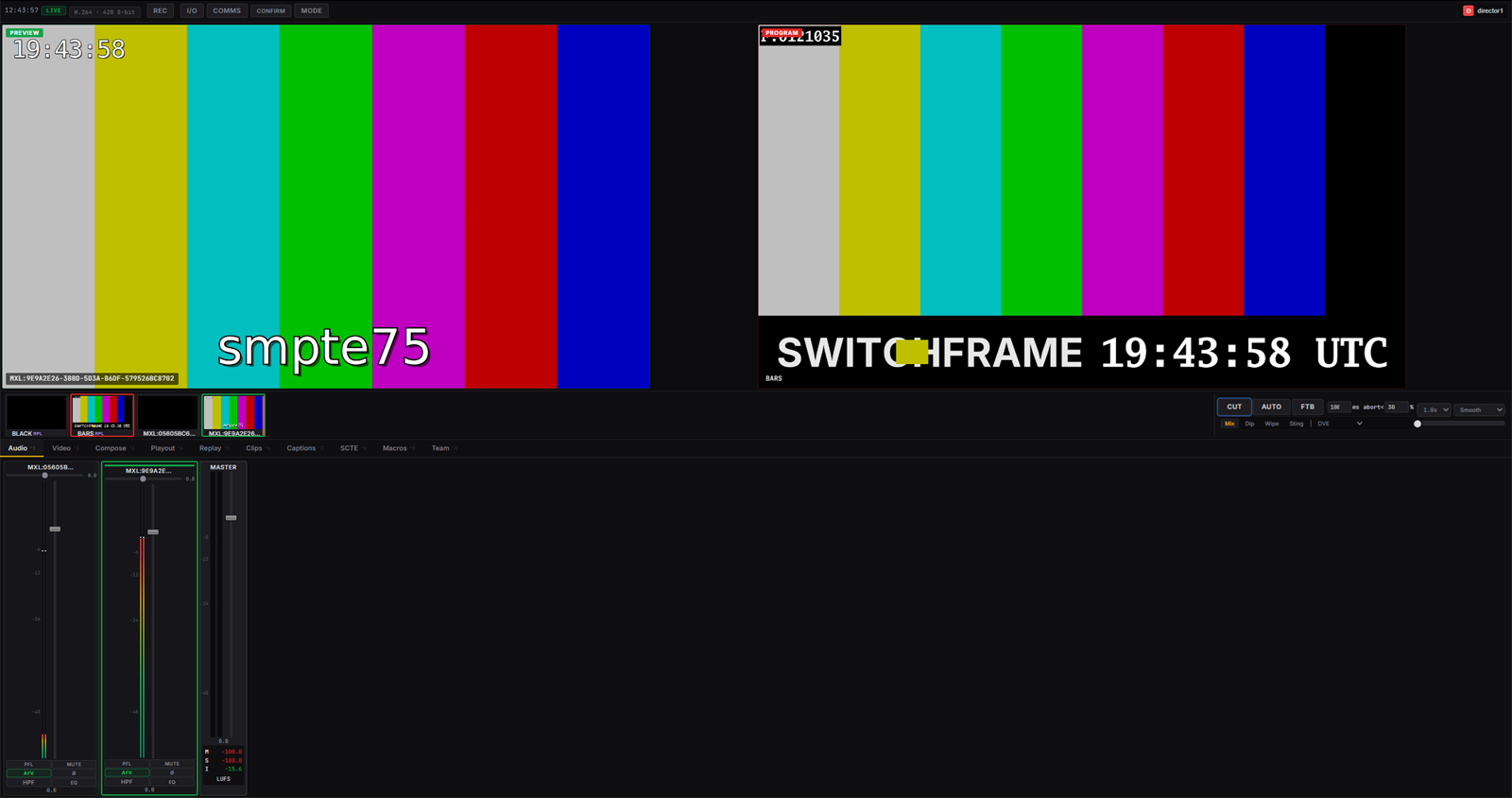
The media function in every production is SwitchFrame, an open-source software vision mixer, built with MXL support. Camera and A/V sync test sources feed it through MXL SDK v1.1.0. The director operates it from a browser.
Why this was done
Both projects were built to see how DMF works in practice, and to gain a deeper understanding of the mechanics involved.
DMF has the potential to let anyone provision and launch a professional broadcast production environment with very little knowledge of the technologies that power it. That level of accessibility could lead to a wave of self-service, pay-as-you-go professional production products. In fact, there could be a broadcast app store, where media functions are purchased, downloaded and plugged into a DMF. There would be no need for a team of broadcast engineers to configure and maintain the production environment.
Physical broadcast facilities could become non-proprietary virtual hosting environments. Cloud hosting would be the ideal home for them, if cloud providers can bring down their notoriously high data transfer and egress costs.
Eventually, AI will be able to build, configure and manage DMF environments on its own. That seems inevitable.
Goals
Prove the architecture
Implement every layer of the reference architecture and the full workload lifecycle, from design to finalise, on one machine anyone can rebuild from scratch.
Say what, not how
The designer states intent and requirements. The orchestrator makes every infrastructure decision: ports, user IDs, memory sizes, containers and hosts.
Refuse early
A design the facility can't run is refused before anything changes, with every problem named at once. The Toolkit greys out options the facility can't honour.
Media on MXL only
Between functions, video and audio go only through MXL shared memory. The network carries only control traffic, browser monitoring and SRT at the edge.
Isolated productions
Each production gets its own namespace, resource reservation, network policy, sign-in roles and MXL Flow Domain.
Be honest about gaps
A compliance matrix maps each item in the reference architecture to what's built, and marks it met, partial or missing.
How it works
From design to on air
The Toolkit is a high-level declarative language, and the orchestrator is its compiler. The two sides share one XML schema and one facility profile: a list of what this facility can run. The Toolkit uses the profile to grey out options and say why. The compiler uses it to refuse anything that slipped through. Flow IDs come from the design, so they stay the same across revisions.
The six layers
The reference architecture describes a facility as six horizontal layers. This is what runs at each one:
Running across all six: orchestration (Terraform and Ansible, driven by make or the facility console), monitoring (Prometheus, Alertmanager, Grafana, Loki), and security (Keycloak, a local certificate authority, policy).
Inside one production
test pattern + tone
test pattern + tone
flash + beep
uncompressed 10-bit video · 32-bit float audio
vision mixer; programme written back to MXL
low-res proxies over WebTransport
contribution in, programme out
The sources write frames into the production's Flow Domain, and SwitchFrame reads them straight from memory. Nothing uncompressed crosses the network. The director sees compressed proxies in the browser. Outside sources reach the facility over SRT, and the programme can go out over SRT, RTMP or to a recording.
Keeping settings applied
SwitchFrame forgets destinations and recording when it restarts, and it resets an SRT source every time the encoder reconnects. So each production runs a small reconciler next to it. The reconciler applies the design's settings, reapplies them after any restart or reconnection, and applies a new revision without restarting anything when only settings changed. Unchanged settings are never sent again, so an operator's live changes stand.
The lifecycle
- DesignDrawn in the Toolkit, published as XML
- PlanCompiled, capacity and clashes checked, changes shown
- ProvisionFlow Domain, namespace, sign-in and functions created
- ConfigureConnections made; reconciler applies every setting
- OperateOperators sign in and run the show
- FinaliseRecordings, design, logs and state archived, then torn down
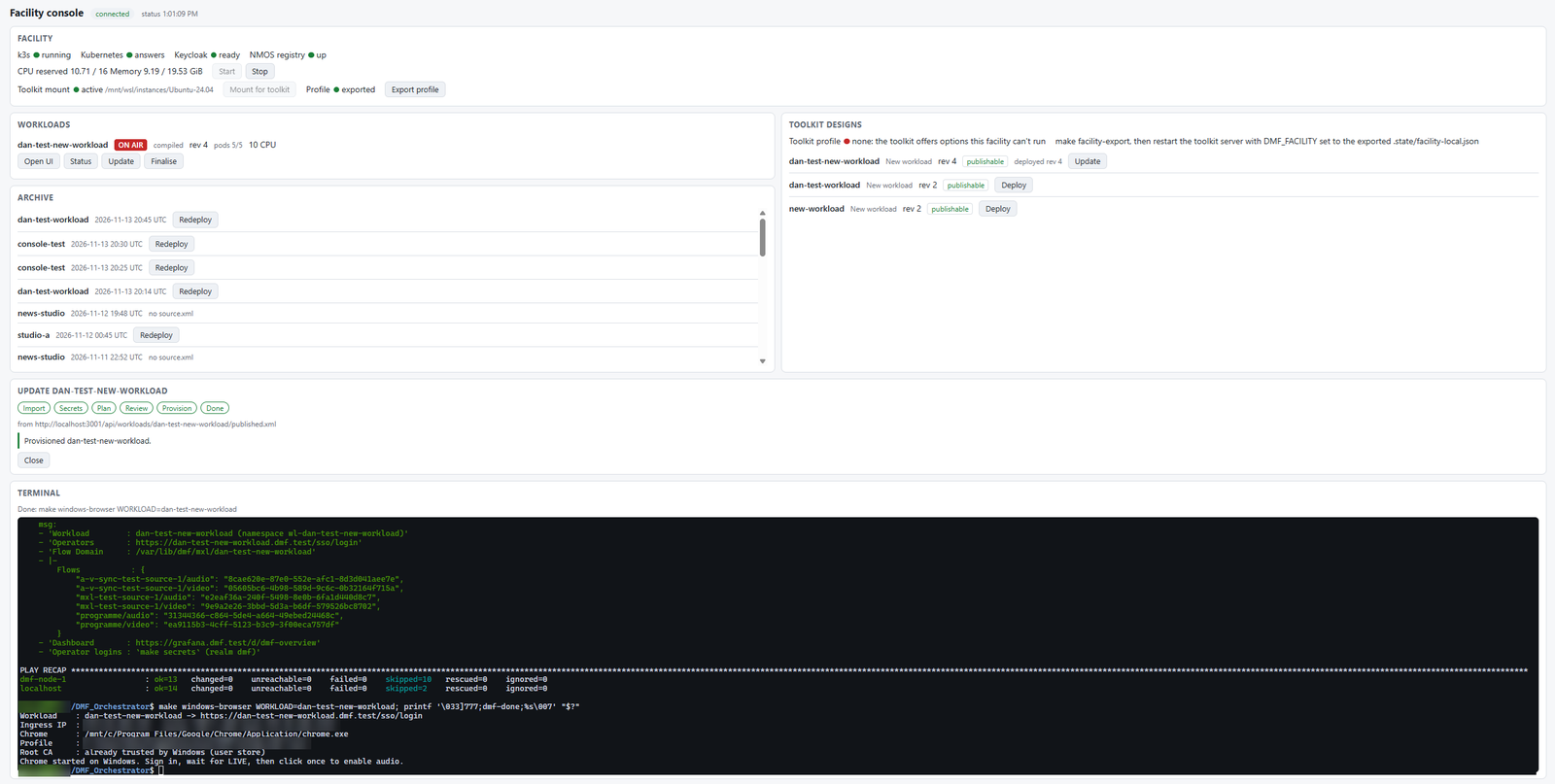
Each stage is a make target. The facility console is a local web page that shows the state of the facility and runs the same lifecycle from buttons. Each button types its command into a terminal on the page, so you see exactly what runs. Before anything is provisioned, a review dialog shows what the plan will create, change and restart.
How it was built
Both projects were built with Claude, Anthropic's AI model, working in Claude Code, from the first canvas prototype to a working facility console. A human set the direction, made the design decisions and reviewed each stage. Claude wrote the code, the tests and the documentation, and ran the facility to check the results.
| Stage | Where | Result |
|---|---|---|
| 1 | Toolkit | Product options settled, feature toggles, test source modules |
| 2 | Toolkit | XML publishing, with the shared schema |
| 3 | Orchestrator | Offline compiler, with golden-file tests |
| 4 | Orchestrator | A Toolkit design runs from XML, matching the hand-written example |
| 5 | Orchestrator | Reconciler, secrets, SRT, RTMP and recording |
| 6 | Orchestrator | Remaining settings wired through |
| 7 | Both | Greyed-out options, and a full end-to-end run from the Toolkit |
| 8–9 | Orchestrator | Facility console: status, terminal, lifecycle buttons and the deploy flow |
Problems found and fixed
Running real software end to end turned up problems that no design document would have shown. Each fix is applied as a patch at build time, checks that the upstream code it changes is still the same, and runs upstream's own tests:
- SwitchFrame didn't build with MXL at the pinned commit. Go won't let one package mix cgo and assembly, so the 10-bit video kernels were moved into a package of their own.
- Crackling audio came from the browser player's 50 ms start buffer, which switched between sound and silence about twice a second. It now buffers 150 ms.
- Audio timestamps were rounded to 11.1 ms, while each audio frame lasts 21.33 ms. They are now sent unchanged.
- Lip sync was measured with a purpose-built sync source that flashes and beeps once a second. Four timing fixes brought the results below:
| A/V offset | Before | After |
|---|---|---|
| Programme on MXL | 66 to 195 ms | +22 ms, steady |
| Programme in Chrome | −371 to +422 ms | 26 to 29 ms, steady |
The orchestrator also adds three small tools of its own. A flow agent registers every MXL flow with NMOS and exports per-flow metrics. An SSO bridge gives SwitchFrame single sign-on without patching it. An admission policy stops a production's containers from reaching any Flow Domain but their own.
Stack
- React 19, TypeScript, Vite, React Flow
- Node 24 API with built-in SQLite
- Product catalogs and a versioned feature library
- XML output checked against the shared XSD
- Python compiler and reconciler
- Terraform, Ansible, k3s, Helm
- MXL SDK v1.1.0, SwitchFrame, NMOS IS-04
- Keycloak, cert-manager, Prometheus, Grafana, Loki
Results
In the end-to-end test, a production was designed and revised only through the Toolkit's API, then deployed with nothing typed by hand except passwords and secrets. It had an MXL test source, an SRT source, SRT output with AES encryption, RTMP output and recording. The run covered:
- Every setting read back correctly from the running mixer. The SRT and RTMP outputs were received by a local receiver, and the recording was written.
- A settings-only revision restarted nothing. The same containers, destinations and flow IDs stayed, and only the changed setting was applied.
- After a stop and start, every setting, destination and the recording came back without anyone touching it.
- A design hand-edited to ask for SMPTE ST 2110 was refused at compile time, with the option named, and nothing changed.
- Finalise archived the design, logs, state and 46 recordings, then released everything, with no secret in the archive.
The same lifecycle then ran again from the facility console's buttons: deploy, a settings-only update, stop and start, finalise, and a redeploy from the archive.
Limits of a proof of concept
- One machine. A 16-core host runs one designed production at a time, because live media functions reserve their CPU in full.
- No PTP under WSL2. Windows controls the clock there. Precise timing needs real hardware with a PTP-capable network card.
- 1080p or 2160p only. At the pinned commit, SwitchFrame's MXL path can't carry 720p frames, so the Toolkit and the compiler both refuse 720p in a design that uses MXL.
- Not built yet: SMPTE ST 2110 (needs special network cards), GPU features, speech-to-text captions and CI pipelines. These are listed as gaps in the compliance matrix.